CallToU Caregiver Pager review for 2026: this is a practical alert system for homes that need fast, simple help requests without a phone app or complex setup.
It is best understood as a room-to-room caregiver call solution rather than a polished smart-home gadget.
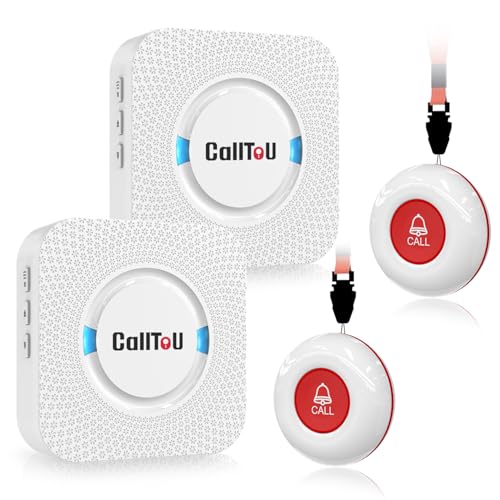
CallToU Caregiver Pager Review Summary
CallToU Caregiver Pager makes sense for buyers who want a straightforward way for an elderly parent, patient, or disabled person to signal for help at home.
The main appeal is clear: two wireless buttons, two receivers, loud whole-home alerts, and a plug-in design that does not depend on Wi-Fi or a mobile app.
For the right household, that simplicity is the point.
The system is built around accessibility, with a button that can be worn, hung, or mounted, and receivers that can move with the caregiver as long as they stay plugged in.
If you are comparing caregiver pagers and want something that is easy to explain to a relative, this is a strong fit.
Review Scorecard
| Category | Score | Rationale |
|---|---|---|
| Ease of use | 9/10 | Button-based calling keeps operation obvious for seniors and caregivers. |
| Coverage potential | 8/10 | The listing claims 500+ ft in open areas and through-wall use. |
| Alert flexibility | 8/10 | 55 tones and 5 volume levels give useful control over how alerts sound. |
| Care setting fit | 9/10 | Good for bedrooms, kitchens, bathrooms, and other home caregiving spaces. |
| Installation simplicity | 9/10 | Plug-in receivers and wireless buttons reduce setup friction. |
| Durability confidence | 7/10 | Waterproof and dustproof claims are useful, but still listing-based. |
| Value for buyers | 8/10 | Two receivers and two buttons increase usefulness for multi-room coverage. |
Key Features and Specifications of CallToU Caregiver Pager
The core package includes 2 wireless receivers and 2 call buttons.
That matters because the product is not just a single-point alert device; it is meant to cover more than one room or more than one person who may need help.
The listing says the receiver can be moved around the home and still work in open areas up to 500+ feet.
It also says the system can work through walls.
For home caregiving, that is the right kind of range claim to pay attention to, because the real use case is often not a large campus but a house with closed doors, hallways, and multiple floors.
The receivers plug into electrical outlets.
That makes them easy to place, but it also means they are not battery-based portable receivers.
The call button is the more flexible piece: it can be worn around the neck with a strap, hung, or secured with a bracket or double sticker.
Other listed features include:
- 55 ringtone choices
- 5 adjustable volume levels from 0 dB to 110 dB
- Waterproof and dustproof construction for both button and receiver
- Use in bedrooms, kitchens, living areas, washrooms, and outdoor rainy conditions
That feature mix points to a home alert device that is trying to solve practical caregiving problems rather than chase smart-home novelty.
Pros and Cons of CallToU Caregiver Pager
Pros
- Very easy to understand and use. A call button is simpler than an app, voice assistant, or intercom system.
- Multiple receivers and buttons add flexibility. Two of each helps cover more rooms or more than one care recipient.
- Adjustable sound settings are useful. The volume range and ringtone selection make it easier to match different home layouts.
- Good fit for wet or messy areas. The waterproof and dustproof claims are especially relevant for bathrooms and bedside use.
- No Wi-Fi dependency. That can matter in homes with weak internet, older users, or caregivers who want a system that stays basic.
Cons
- Receivers must stay plugged in. That limits placement unless an outlet is nearby.
- Listing claims are doing a lot of work. Range and durability are based on product information, not hands-on verification here.
- Not ideal if you want a smart system. There is no sign of app integration, remote notifications, or monitoring features.
- Volume can be a tradeoff. Very loud alerts are good for hearing, but they may be too disruptive in quiet homes.
Who Should Buy CallToU Caregiver Pager?
This is a good match for families caring for an older adult, a patient recovering at home, or someone with limited mobility who needs an easy way to request attention.
It also fits shared homes where the person who needs help may be in one room and the caregiver in another.
It is especially sensible if the buyer wants something that can be deployed quickly and explained in one sentence: press the button, hear the receiver.
That level of clarity matters in real caregiving, where complicated devices often go unused.
You should probably skip it if you want remote smartphone alerts, smart-home automation, or a system designed for professional monitoring.
It is also less appealing if you need a receiver that can run on battery and move anywhere without outlet access.
If your household values low-friction communication over feature depth, this is the kind of product that can solve an everyday problem without creating new ones.
Caregiver Alert Setup and Daily Use
Button Placement Matters
The call button is the most important part of the system because it decides whether help requests are convenient or awkward.
The included mounting options, neck strap, and easy carry design suggest the product is trying to adapt to different mobility needs.
That is useful when one person may prefer a pendant-style setup and another may need the button fixed near a bed or chair.
Receiver Placement Is the Real Limitation
The receiver’s plug-in design is a strength for setup and a limitation for flexibility.
In practical terms, you want an outlet near the room where the caregiver spends time.
Since the system includes two receivers, the listing clearly anticipates that a single outlet location is not enough for many homes.
Sound Customization Helps in Real Homes
Fifty-five ringtones is more than a novelty if you care about household separation.
Different tones can help distinguish one alert from another, and five volume levels give some room to balance audibility with comfort.
For families juggling naps, TV, and overnight care, that control is more useful than it might look on paper.
Bathroom and Rain Use Expand the Use Case
The waterproof and dustproof claims are a meaningful part of the design, because caregiver alerts often fail at the exact moment they are needed in wet or dusty places.
A system intended for bathroom use or outdoor conditions has a better chance of being used consistently across the whole house.
Alternatives to CallToU Caregiver Pager
If you want a similar wireless nurse-call style setup, look at Sadotech wireless doorbell systems.
They are often considered when buyers want simple plug-in alert hardware with a familiar format.
Another credible option is SECRUI wireless doorbell systems, especially if you want a basic button-and-receiver layout and are comparing alert range or tone choices.
If you need a more assistive-care oriented search path, wireless caregiver pager systems can surface competing models with similar use cases and different button/receiver counts.
For buyers who want a broader home-alert setup, wireless call button for elderly is a useful search because it often brings up simpler one-button systems as well as multi-room kits.
Is CallToU Caregiver Pager Worth It?
Yes, if your main goal is dependable, low-friction communication inside the home.
The CallToU Caregiver Pager is worth considering because it combines simple operation, multiple alert options, and enough hardware to cover more than one room.
The tradeoff is that it stays firmly in the basic caregiver-alert category.
If that is what you need, its simplicity is a feature, not a weakness.
If you want apps, remote monitoring, or smart-home behavior, you should keep looking.