A TV remote can become frustrating when small labels, crowded buttons, or accidental input changes get in the way. A simpler layout may make everyday viewing easier for someone living with dementia—and for the person helping them.
These 10 options include TV-only and TV-and-cable remotes, with features such as large buttons, backlighting, and learning functions. The right choice depends on the equipment in the room and the controls the viewer actually needs.
Best 10 Dementia Friendly Remotes Picks for 2026
Samsung Plug-and-Play Pick

- Large tactile buttons
- No programming for Samsung TVs
- Does not control cable or streaming
Best For: Simple Samsung TV setups
Backlit Button Pick

- Six large backlit buttons
- IR TV and cable-box control
- Wrist strap included
Best For: Dim rooms and easy-to-see controls
Best Backlit Pick
GE BigEZ OneTouch Universal TV Remote
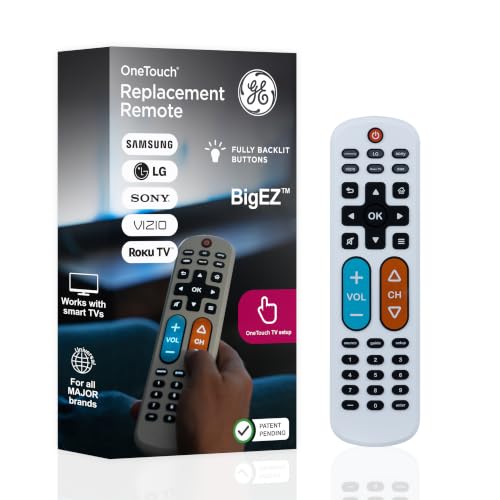
- Fully backlit, large buttons
- Preset for five TV brands
- Controls up to two devices
Best For: Easier-to-see controls on a supported TV
Best for TV and Cable

- Large color-coded buttons
- Controls TV and cable box
- Needs IR line of sight
Best For: Traditional TV-and-cable setups
Best for Comfort
Gmatrix Big Button Universal Remote

- Slide-cover design
- TV-only or TV-plus-box use
- AAA batteries not included
Best For: Large buttons with a slide-cover layout
Fewest Buttons
Anderic RR1004 Big Button Remote

- Eight essential buttons
- Large glow-in-the-dark keys
- Infrared only; LG pre-programmed
Best For: Basic TV control with minimal button clutter
Backlit Multi-Device Pick
UltraPro BigEZ OneTouch Remote

- Fully backlit, color-coded buttons
- Preprogrammed for five TV brands
- Controls a TV plus one device
Best For: Visible controls and two-device setups
Spill-Resistant Design
FurnyQuaint Big Button TV Remote

- High-contrast, colored buttons
- Rubber-covered battery compartment
- 25-button layout
Best For: Visible keys and protection from everyday spills
Samsung Plug-and-Play Pick – EZclicker Big Button Remote
Among dementia friendly remotes, this EZclicker is a straightforward choice when the person uses a Samsung TV and does not need to control a cable box or streaming device. Its large, tactile buttons include an extra-large enter button.
Best For: Samsung TV users who want basic, easy-to-feel controls without programming.
Pros:
- Works with compatible Samsung TVs after batteries are inserted; no pairing required.
- Large buttons and tactile feedback can make controls easier to locate.
- Compact, lightweight design is easy to handle.
Cons:
- Does not control cable boxes, streaming devices, or non-Samsung TVs.
- Requires two AAA batteries, which are not included.
Choose this for a Samsung-only setup; check the viewing setup first if another device handles channels or apps.
Favorite-Channel Pick – Flipper Big Button Remote
The Flipper stands out among dementia friendly remotes for traditional TV viewing: its everyday controls are large and color-coded, while additional setup buttons stay under a sliding cover. It can control a TV and a compatible cable or satellite box.
Best For: Households using broadcast, cable, or satellite TV that want a simplified way to reach favorite channels.
Pros:
- Large, tactile, color-coded controls keep everyday operation simple.
- Can be set to cycle through up to 25 favorite channels.
- Can combine basic TV and compatible cable or satellite box controls.
Cons:
- Cannot navigate streaming app menus.
- Requires two AA batteries, which are not included.
This is a strong match when someone primarily watches familiar live channels; it is not a replacement for a streaming-device remote.
Backlit Button Pick – EasyMote DT-R08W
For shoppers comparing dementia friendly remotes, the EasyMote offers six large, backlit buttons for basic TV control. It uses infrared and can be configured to operate a TV and cable box with one handheld remote.
Best For: Viewers who need easy-to-see buttons, including in dim rooms, and a wrist strap to help keep the remote close.
Pros:
- Six large buttons have bright backlighting and clear text.
- Quick Search finds a TV code, and learning mode allows custom button commands.
- Includes a wrist strap that can help prevent misplacement.
Cons:
- Initial setup may be needed to match the TV or teach custom commands.
- Requires two AA batteries, which are not included.
The backlighting is its clearest advantage; confirm that the devices use infrared, and allow time to set up the controls.
Slide-Cover Pick – Gmatrix Universal TV Remote
The Gmatrix is an option among dementia friendly remotes for households wanting large, color-coded tactile buttons without giving up access to additional controls. Its slide-cover design offers a simpler everyday face for TV-only or TV-and-cable-box setups.
Best For: Viewers who benefit from prominent everyday buttons but share a TV setup that needs extra controls.
Pros:
- Large, color-coded tactile buttons support easier everyday use.
- Slide cover keeps additional buttons out of the way until needed.
- Designed for infrared TV-only or TV-and-set-top-box setups; soundbar use is also listed.
Cons:
- The additional buttons may be more complex than a remote with only a few controls.
- Xfinity boxes need a direct infrared line of sight; concealed boxes may require an IR extender.
- Requires two AAA batteries, which are not included.
Consider it when a caregiver can handle setup and the household needs both simple front-facing controls and access to more functions.
Best Backlit Pick – GE BigEZ OneTouch Universal TV Remote
Among dementia friendly remotes, the GE BigEZ OneTouch is a practical choice when seeing and finding the buttons is the main challenge. Its large white body, fully backlit buttons, and differently colored volume and channel buttons make key controls easier to identify.
Best For: Someone who needs a more visible remote for a supported TV brand, with optional control of a second device.
Pros:
- Preset TV buttons simplify setup for Samsung, LG, Vizio, Sony, and Roku TVs.
- Large, backlit buttons improve visibility.
- Can control a TV and one additional compatible device.
Cons:
- Two AA batteries are not included.
- Controlling another device may require programming the AUX button.
Choose this one for visibility and straightforward setup with its preset TV brands. If a second device is essential, check its compatibility and allow time to set up AUX.
Best for TV and Cable – Nettech Big Button Remote
For shoppers comparing dementia friendly remotes for a traditional TV-and-cable setup, this Nettech model combines large, color-coded tactile buttons with control of a TV and cable or satellite box. It may reduce the need to switch between two remotes.
Best For: A household using a TV with a compatible cable or satellite box and wanting larger, easier-to-distinguish buttons.
Pros:
- Large, color-coded tactile buttons emphasize common controls.
- Supports control of a TV and a cable or satellite box.
- Listed compatibility includes major TV brands and providers such as Xfinity and Spectrum.
Cons:
- Infrared operation requires a clear line of sight; an Xfinity box hidden behind furniture may need an IR extender.
- Two AAA batteries are required.
This is a sensible option when two-device control matters as much as button size. Check that the box can receive an infrared signal from the usual seating position.
Best for Comfort – Gmatrix Big Button Universal Remote
The Gmatrix Slider Remote is worth considering among dementia friendly remotes if you want large, color-coded tactile buttons and the flexibility to run a TV alone or a TV with a cable set-top box. Its slide-cover design distinguishes it from a conventional button layout.
Best For: Someone who wants prominent everyday buttons while retaining a slide-cover design for additional controls.
Pros:
- Supports TV-only or TV-plus-set-top-box use.
- Large, color-coded tactile buttons are designed for easier use.
- Listed infrared compatibility includes providers such as Xfinity and Spectrum.
Cons:
- Requires a direct line of sight to an Xfinity box; a hidden box may need an IR extender.
- Two AAA batteries are not included.
This model offers a useful choice between single-device and two-device control. Before buying for a cable setup, confirm that its infrared signal can reach the set-top box.
Fewest Buttons – Anderic RR1004 Big Button Remote
Among dementia friendly remotes, the Anderic RR1004 stands out for its eight-button layout. It keeps everyday TV control focused on power, volume, channels, mute, and closed captions, with large glow-in-the-dark keys.
Best For: Someone who needs basic TV controls with as few buttons as possible.
Pros:
- Eight-button layout limits visual clutter.
- Large glow-in-the-dark keys help in low light.
- Pre-programmed for LG TVs; can learn functions from an existing infrared remote.
Cons:
- Does not work with RF or Bluetooth systems such as Roku, Fire TV, Jubilee, or Xfinity.
- Other TVs may need initial programming, and TV-plus-cable control is not guaranteed.
The RR1004 is a strong choice when simplicity matters more than navigation features. Check that the TV uses infrared control before buying, and plan for a caregiver to handle setup if needed.
For shoppers comparing dementia friendly remotes, the UltraPro BigEZ OneTouch offers large, fully backlit buttons while retaining a directional pad for navigation. Its white body and differently colored volume and channel buttons provide additional visual cues.
Best For: A household that needs visible buttons and control of a TV plus one additional device.
Pros:
- Preprogrammed TV buttons for Samsung, LG, Vizio, Sony, and Roku TVs.
- Backlit buttons and color-coded volume and channel controls.
- Supports one additional device, with U.S.-based technical support available for setup questions.
Cons:
- Its 20 buttons may be more than someone seeking only basic TV functions wants.
- Requires two AA batteries, which are not included.
This is the more flexible option if an extra device or on-screen navigation is necessary. If fewer choices are the priority, its additional controls may be a drawback.
The FurnyQuaint Big Button remote is an option among dementia friendly remotes when visible keys and protection from everyday spills are priorities. It has large, brightly colored buttons, high-contrast labels, and a rubber-covered battery compartment designed to help keep out water and dust.
Best For: Someone who benefits from high-contrast buttons and may be prone to spills.
Pros:
- Large, brightly colored buttons with high-contrast labels.
- Protected battery compartment helps guard against water and dust.
- Lightweight, ergonomic design intended for comfortable handling.
Cons:
- Its 25 buttons create a busier layout than minimalist remotes.
- Two AAA batteries are not included.
The protective design is its main advantage, but the higher button count may be confusing for someone who needs only power, volume, and channels. Confirm the functions needed for the intended TV setup before choosing it.
How We Picked the Best Dementia Friendly Remotes
We focused on controls that could simplify common TV tasks: power, volume, channels, and, where needed, cable-box operation. We also considered button size, visual contrast, setup approach, and whether a remote is intended for a specific TV brand or broader use. A large-button label alone is not enough; the best fit is the remote that operates the viewer’s actual equipment with the fewest unnecessary choices.
Quick Comparison: Start with the TV Setup
Samsung TV only: The EZclicker option is intended for Samsung TVs, making it worth considering when no other device needs control. Traditional TV without streaming: Flipper is designed around a simplified, non-streaming experience. TV plus cable or set-top box: The listed universal TV-and-cable models are the starting point if both devices must work together. Visibility or custom setup: Consider the EasyMote DT-R08W for its listed backlight and learning function, or the glow-key learning model if illuminated keys are a priority. The GE and UltraPro BigEZ OneTouch models and Anderic RR1004 round out the big-button choices, but check their device support and button layouts before buying.
Key Buying Factors for Dementia-Friendly Remotes
Keep the Necessary Buttons, Not Just Large Buttons
Look for a clear power button, easy-to-find volume controls, and only the channel or input controls the person uses. Color coding or distinct button shapes may help, but consistency matters more: changing the layout can require relearning a familiar routine.
Confirm Compatibility Before Ordering
Write down the TV brand and model, plus any cable-box or set-top-box model. Check whether the remote controls the TV alone, the box alone, or both. A universal remote may still require a supported code or a working original remote for learning. If viewing depends on an app or streaming device, confirm that the necessary navigation controls are available; a remote built for traditional channels may not be suitable.
Plan for Setup and Daily Use
Check who will program the remote and whether settings remain in place after a battery change. If possible, test power, volume, channels, and input selection before putting the original remote away. Keep a backup accessible to a caregiver, especially if occasional menu or troubleshooting controls are needed.
Who Should Buy Which Dementia Friendly Remotes?
Choose a brand-specific remote when it matches the TV and simplicity outweighs flexibility. Choose a TV-and-cable model when changing channels requires a separate box; verify both devices are supported. Consider backlit or glow keys for dim rooms, and learning functions when a caregiver can set up a small set of essential commands. Above all, match the remote to the viewer’s established habits rather than adding features they are unlikely to use.