A remote is hard to use when the buttons are tiny, crowded, or difficult to tell apart. The best low vision TV remotes make essential controls easier to find without adding menus or extra steps.
These nine options range from TV-brand-specific replacements to universal and learning remotes. The right choice depends on the equipment you use, the controls you need, and who will handle setup.
Best 9 Low Vision TV Remotes Picks for 2026
Best for LG TVs

- 13-button layout with extra-large enter key
- Tactile controls; no programming required
- LG TVs only; two AAA batteries not included
Best For: Simple, dedicated LG TV control
Best Backlit Option
GE BigEZ OneTouch Universal Remote
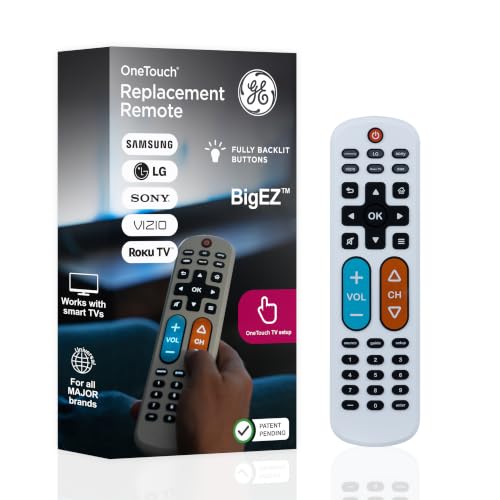
- Fully backlit, large buttons
- Preset for five TV brands
- Controls one additional device; two AA batteries not included
Best For: Visible controls for a supported TV and second device
Simple Vizio Pick
EZclicker Big Button TV Remote
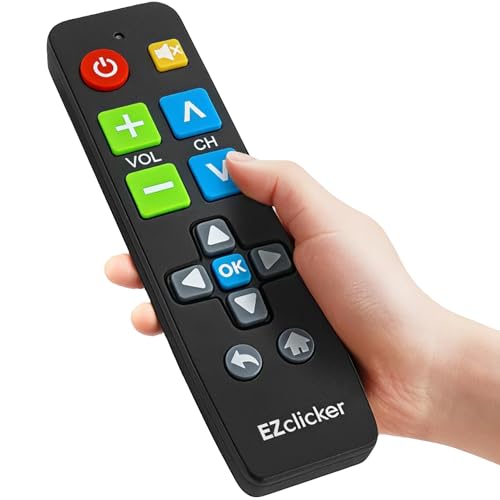
- Large, tactile buttons
- No programming for Vizio TVs
- TV-only; AAA batteries not included
Best For: Straightforward Vizio TV control
Flexible Two-Device Pick

- Fully backlit, color-distinguished controls
- OneTouch setup for five TV brands
- Controls up to two compatible IR devices
Best For: Accessible TV controls with a second device
Simple TV Replacement
uehba Large Button Universal Remote

- Large, clearly marked buttons
- Designed for one TV
- Two AAA batteries not included
Best For: A basic, easier-to-read TV replacement
Learn-from-Original Option
TSCFGBTH Big Button Learning Remote

- Large enter button and tactile feedback
- Copies commands from an original remote
- Listed as supporting one device
Best For: Users who still have the original remote for setup
Minimal-Button Pick
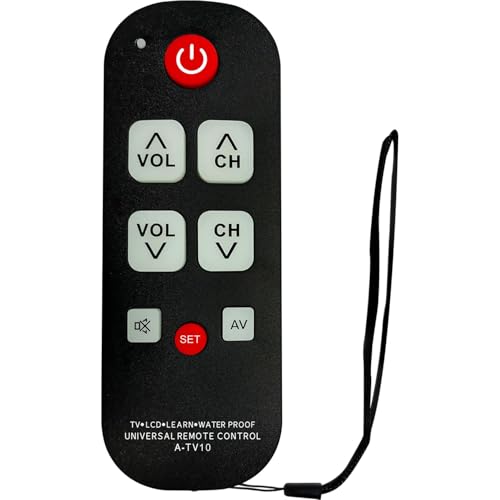
- Ten oversized, labeled buttons
- Learns essential TV commands
- Intended for one TV
Best For: Simplified TV control with an existing remote for setup
Best for LG TVs – EZclicker Big Button Remote
Among low vision tv remotes, this EZclicker model keeps things simple for LG TV owners. It has 13 buttons, including an extra-large enter button, with tactile feedback and no programming required.
Best For: Someone who uses an LG TV and wants fewer, larger buttons without controlling other devices.
Pros:
- Large buttons and tactile feedback make controls easier to locate.
- Works with LG TVs without programming.
- Compact, lightweight body is easier to handle and store.
Cons:
- Does not control cable boxes, streaming devices, or non-LG TVs.
- Requires two AAA batteries, which are not included.
This is a focused choice when simplifying LG TV control matters more than replacing every remote in the room.
Best for TV and Cable – Nettech Color-Coded Big Button Remote
For shoppers comparing low vision tv remotes for a traditional TV-and-cable setup, this Nettech remote combines basic control of two devices. Its large, color-coded tactile buttons aim to reduce confusion without keeping separate TV and box remotes close at hand.
Best For: A viewer who needs straightforward TV and cable or satellite controls on one remote.
Pros:
- Large, color-coded tactile buttons distinguish key controls.
- Controls basic functions on a TV and a compatible cable or satellite box.
- Preprogrammed design supports a simpler setup.
Cons:
- Infrared control needs a clear path to the device; an Xfinity box hidden behind furniture may require an IR extender.
- Requires two AAA batteries.
Choose this one if consolidating a conventional TV and set-top box is the priority; check the box placement before buying.
Best Backlit Option – GE BigEZ OneTouch Universal Remote
The GE BigEZ OneTouch stands out among low vision tv remotes for its fully backlit buttons and large white body. Preset buttons cover Samsung, LG, Vizio, Sony, and Roku TVs, while an AUX mode can control a second compatible device.
Best For: Someone who wants easier-to-see buttons and control of a supported TV plus one additional device.
Pros:
- Fully backlit buttons improve visibility, with distinct blue volume and orange channel buttons.
- Preset TV buttons simplify setup for five listed TV brands.
- AUX mode and directional pad add options for a compatible second device.
Cons:
- TV brand presets are limited to Samsung, LG, Vizio, Sony, and Roku TVs.
- Two AA batteries are required but not included; a non-Roku AUX device needs programming.
This is the more flexible pick when button visibility and two-device control outweigh the appeal of a minimal button layout.
Simple Vizio Pick – EZclicker Big Button TV Remote
For shoppers comparing low vision tv remotes for a Vizio television, the EZclicker keeps things straightforward: 13 large, tactile buttons include an extra-large enter button, and it works without programming.
Best For: Someone who wants basic, easy-to-feel controls for a Vizio TV without a setup process.
Pros:
- Large buttons and tactile feedback can make controls easier to find by touch.
- Works with compatible Vizio TVs after you insert the batteries.
- Compact, lightweight design is easy to handle.
Cons:
- Does not control cable boxes, streaming devices or other TV brands.
- Requires two AAA batteries, which are not included.
This is the uncomplicated choice if the television is a Vizio and fewer controls matter more than device flexibility. Confirm the TV brand before buying.
Fewest Buttons – EasyMote Backlit TV Remote
The EasyMote takes a minimalist approach to low vision tv remotes, with six large, bright backlit buttons and big, clear text. It can control an infrared TV and cable box from one handheld remote.
Best For: Someone who needs only basic TV controls and wants large buttons that remain visible in the dark.
Pros:
- Backlit, clearly labeled buttons reduce visual clutter.
- Quick Search and learning mode offer ways to set up compatible infrared equipment.
- Included wrist strap helps keep the remote close at hand.
Cons:
- Limited to six buttons, so it is not suited to users who need many direct controls.
- Requires two AA batteries, which are not included; some Xfinity and Dish equipment needs IR activated.
Choose this one when simplicity is the priority, but check that your TV and set-top box accept infrared commands and allow time for initial setup.
Flexible Two-Device Pick – Philips BigEZ OneTouch Remote
Among low vision tv remotes, the Philips BigEZ offers a useful middle ground: its fully backlit keypad has large, color-distinguished volume and channel buttons, while its two-device design can also cover compatible auxiliary equipment.
Best For: Someone with a Samsung, LG, Sony, Vizio or Roku TV who wants accessible buttons plus control of a second infrared device.
Pros:
- Backlit buttons and prominent blue volume and orange channel controls aid navigation.
- OneTouch TV setup supports the five listed TV brands after batteries are inserted.
- Can control a TV and a compatible set-top box, streaming player or soundbar.
- Directional and playback controls provide more options than a basic-only remote.
Cons:
- The additional device may require programming; the AUX button starts out set for Roku boxes.
- Requires two AA batteries.
This is the more capable choice if basic volume and channel buttons are not enough. Its 15-button layout offers added functions, though it is less stripped-down than a six-button remote.
Simple TV Replacement – uehba Large Button Universal Remote
Among low vision tv remotes, this uehba model is a straightforward choice if you want large, clearly marked buttons without a complicated layout. It is an infrared remote designed to control one TV and comes with programming instructions.
Best For: Someone replacing a hard-to-read TV remote who wants basic, easy-to-see controls.
Pros:
- Extra-large, clearly marked buttons improve visibility.
- Compatible with most major TVs, according to the manufacturer.
- Ergonomic ABS build and a stated 10-meter range.
Cons:
- Controls one TV, not a collection of devices.
- Requires two AAA alkaline batteries, which are not included.
Choose this for a simpler TV-only replacement; check compatibility with your TV before buying.
If you are comparing low vision tv remotes and still have the original remote, this learning model offers big buttons, tactile feedback, and an extra-large enter button. Its listed compatibility extends to TVs and equipment such as DVD players, streaming devices, and cable boxes, but setup requires the original remote.
Best For: A household with an accessible original remote that wants to copy controls onto larger buttons.
Pros:
- Large enter button and tactile feedback aid button identification.
- Learning setup can copy commands from an existing remote.
- Lists support for TVs and other entertainment equipment.
Cons:
- Cannot be set up as described if the original remote is lost.
- Specifications list a maximum of one supported device, despite broader compatibility claims.
This is worth considering for its learning feature, but confirm that it can handle your intended setup—especially if you need to control more than one device.
For shoppers seeking low vision tv remotes with fewer controls to sort through, this A-TV10 has 10 oversized, clearly labeled buttons. Its learning function copies essential TV commands from a current remote, and it is intended for use with one TV.
Best For: Someone who wants a pared-down TV remote and has a current remote available to teach it commands.
Pros:
- Ten-button layout keeps the controls simple.
- Oversized labels and buttons are designed for easier visibility.
- Learning function lets you select essential commands from an existing remote.
Cons:
- Learning setup depends on having a working current remote.
- Ten buttons may not accommodate every function on a more complex TV remote.
This is the most pared-down option here; check that its available buttons cover the TV functions you use regularly.
How We Picked These Low Vision TV Remotes
We focused on features that can make daily TV use more manageable: larger buttons, readable or color-coded layouts, simplified controls, and clear compatibility requirements. We also considered setup demands. A remote that is straightforward for a caregiver to program may still be frustrating if its everyday controls are crowded.
Product descriptions do not establish how well a remote will work with every TV, cable box, or streaming setup. Check the current listing and your equipment model before buying, especially if you rely on an external box for channels.
Quick Comparison: Which Type Fits Your Setup?
Brand-specific remotes: The EZclicker options are listed for LG TVs or Vizio TVs, respectively. Start here if you have the matching brand and want to avoid choosing a universal code, but confirm support for your particular model and required functions.
Simplified universal remotes: The GE BigEZ, Philips BigEZ, and other large-button universal options are worth comparing when you need one remote for a standard TV or want a less cluttered layout. Universal does not mean every function on every device is supported.
Learning remotes: The EasyMote and the listed learning-function remotes may suit setups that need customized buttons or control of a TV and cable box. Check whether setup requires a working original remote; one product explicitly says it does.
Key Buying Factors for Low Vision TV Remotes
Button Visibility and Layout
Look beyond button size. High contrast, distinct shapes or colors, clear labels, and space between keys can help someone locate volume, channels, power, and mute by sight or touch. A backlight can help in a dim room, but it may not improve an overly busy layout.
Compatibility and Everyday Functions
Identify every device the person actually operates: TV, cable or satellite box, soundbar, or streaming device. Then check whether the remote supports the specific functions they use, such as input selection, guide access, or separate power and volume control. Some simple remotes deliberately omit extra keys.
Setup and Accidental Presses
Find out whether setup uses brand codes, automatic search, or button-by-button learning, and whether the original remote must be available. If accidental presses are a problem, prioritize a small set of well-separated essential buttons over the highest button count.
Who Should Buy Which Low Vision TV Remotes?
Choose a compatible brand-specific remote for a straightforward single-TV replacement. Pick a simplified universal model if the viewer mainly needs power, volume, mute, and channels. Consider a learning remote if a caregiver can configure it and the setup requires more than basic TV control. For a TV-and-cable-box household, verify that both devices can be controlled before ordering. Above all, choose the layout the viewer can use reliably—not the remote with the longest feature list.