When you live far from a parent, spouse, or other loved one, small moments of connection matter. The right smart display can make those moments easier by combining video calls, shared calendars, reminders, photos, and home updates in one screen.
In this roundup, we focus on options that help long-distance caregivers stay organized and stay connected without adding more complexity to daily life.
Best 10 Smart Displays for Long-Distance Caregivers Picks for 2026
Compact Alexa Check-In Display
Echo Show 5 for everyday caregiver updates
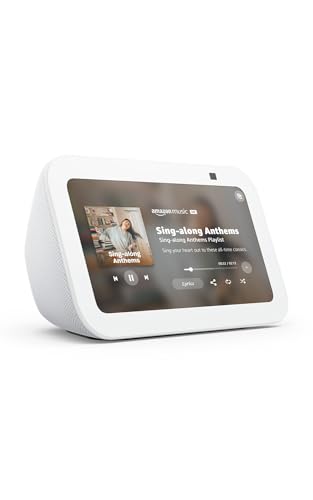
- 5.5-inch screen keeps calls and info easy to see
- Built-in camera helps with remote family and pet check-ins
- Controls compatible smart home devices and cameras
Best For: Caregivers who want a small, Alexa-based screen for quick remote check-ins
Shared Family Planning Hub
15.6-inch calendar for shared caregiving

- Syncs Google, Outlook, iCloud, and other calendars in real time
- Adds meal planning, chores, and reward tracking in one screen
- Large wall-mounted touchscreen works as a family command center
Best For: Families who want a shared schedule-and-organization screen for caregiving
Premium Alexa Care Hub
Echo Show 8 with clearer video calls

- 8.7-inch HD display with more viewing area
- Centered auto-framing camera improves video calls
- Works with camera feeds, reminders, and smart home control
Best For: Caregivers who want a stronger all-around Alexa screen for calls and monitoring
Private Photo Sharing Frame
Frameo 10.1-inch for sharing memories

- Securely shares photos and short videos through the Frameo app
- 10.1-inch IPS touch screen is easy to use for all ages
- Includes calendar, weather, and slideshow options
Best For: Families who want a simple, private frame for sharing memories with loved ones
Kitchen Command Center
Amazon Echo Show 15 (newest model)

- 15.6-inch Full HD screen with customizable widgets
- Built-in Fire TV and included remote
- Auto-framing video calls plus smart-home dashboard
Best For: Caregivers who want a large family hub for organization and check-ins
Security View Hub
eufy Security eufy Smart Display E10

- Instant door alerts with live feed and voice alert
- Four camera views on one screen
- Local playback and simple touchscreen interface
Best For: Caregivers who want fast, security-focused home monitoring
Refurbished Alexa Pick
Echo Show 5 for compact caregiver check-ins
- 5.5-inch display for quick video calls and camera views
- Built-in camera for home, pet, and doorbell check-ins
- Controls compatible lights and thermostats remotely
Best For: Caregivers who want a small Alexa display for quick check-ins and home monitoring
Video Calling Hub
Meta Portal 10-inch Touch Screen for hands-free chat

- Smart Camera keeps people in frame automatically
- Smart Sound helps voices come through clearly
- 10-inch touchscreen is roomy for video chats
Best For: Caregivers who want frequent, hands-free video calls with automatic framing
White Home Video Caller
Meta Portal 10-inch Touch Screen for family check-ins
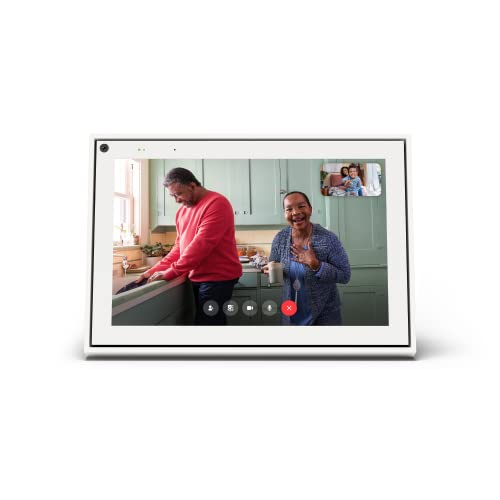
- Smart Camera auto-adjusts to keep callers in frame
- 10-inch touchscreen supports easy voice and touch control
- Camera and microphone can be disabled for privacy
Best For: Caregivers who want a simple home video-calling screen with privacy controls
Compact Alexa Check-In Display – Echo Show 5 for everyday caregiver updates
For smart displays for long-distance caregivers, the Echo Show 5 is a compact option that makes quick check-ins simple. Its 5.5-inch screen, built-in camera, and Alexa voice control help you view compatible cameras, make video calls, and glance at reminders or weather without taking up much space.
Best For: Caregivers who want a small, easy-to-place screen for video calls, camera check-ins, and basic smart home control.
Pros:
- Built-in camera supports viewing family, pets, and compatible doorbells or cameras.
- 5.5-inch display is handy for at-a-glance info, calls, and photos.
- Can control compatible lights and thermostats even when you’re away.
- Privacy features include a mic/camera off button and camera shutter.
Cons:
- Smaller screen than larger smart displays, so it’s less ideal for extended viewing.
- 2 MP camera is functional, but not the most advanced video-call setup.
- Works best inside the Alexa ecosystem and with compatible devices.
In a caregiving setup, this model works best as a compact communication and monitoring hub rather than a full family command center. If you want a small display that can help you stay connected and check in remotely, it’s a practical starting point.
Shared Family Planning Hub – 15.6-inch calendar for shared caregiving
Among smart displays for long-distance caregivers, this 15.6-inch wall-mounted calendar is geared toward coordination more than entertainment. It combines shared scheduling, meal planning, and chore tracking in one touch screen, with real-time syncing for Google, Outlook, and iCloud so family members can stay aligned.
Best For: Households that need a shared wall hub for schedules, chores, meal planning, and family organization.
Pros:
- Real-time sync with Google, Outlook, iCloud, and other platforms.
- Built-in chore chart and reward system can help kids follow routines.
- Large 15.6-inch glare-free HD touchscreen is easy to read on the wall.
- No subscription fees, which keeps ongoing costs down.
Cons:
- No built-in camera or calling features for live caregiver check-ins.
- More of a family organizer than a true voice assistant smart display.
- Best suited for wall or desktop placement, so it isn’t highly portable.
If your caregiving needs are mostly about keeping everyone on the same page, this model is a strong fit. It turns daily planning into a visible shared system, which can reduce missed appointments and confusion across multiple family members.
Premium Alexa Care Hub – Echo Show 8 with clearer video calls
For smart displays for long-distance caregivers, the Echo Show 8 is a strong all-around choice because it combines a larger HD screen, spatial audio, and a centered auto-framing camera. That makes it better suited for regular video calls, live camera viewing, and at-a-glance calendar or reminder checks than a smaller display.
Best For: Caregivers who want a more capable Alexa display for video calls, camera feeds, and daily household coordination.
Pros:
- 8.7-inch HD touchscreen gives more viewing area than the smaller Echo Show 8 model.
- Centered, auto-framing camera with zoom and noise reduction supports better video calls.
- Can view camera feeds, manage lights, thermostats, and other Alexa-compatible devices.
- Room-filling spatial audio and stronger bass improve music and video playback.
Cons:
- Still tied to the Alexa ecosystem for most smart home and assistant features.
- Larger and pricier than compact smart displays if you only need basic check-ins.
- Advanced features may feel like more than you need for simple photo sharing.
This model is one of the best-balanced options if your caregiving routine includes frequent calls and home monitoring. It gives you a better screen and camera experience without moving all the way up to a much larger tablet-style organizer.
Private Photo Sharing Frame – Frameo 10.1-inch for sharing memories
For smart displays for long-distance caregivers, this Frameo digital frame is a simple way to keep family moments visible every day. It focuses on secure photo and short video sharing from the phone app, plus a touch screen that makes it easy for grandparents or other relatives to browse memories without a complicated setup.
Best For: Families who want an easy, private photo-sharing display with optional calendar features.
Pros:
- Free Frameo app lets invited family and friends send photos and short videos securely.
- 10.1-inch IPS HD touch screen offers clear viewing from many angles.
- 32GB of built-in storage can hold a large photo library.
- Can also sync a calendar and display time, weather, and slideshow settings.
Cons:
- No voice assistant or live calling features.
- Video uploads through the app are limited to 15 seconds.
- Best as a memory-sharing frame, not a full smart home control center.
If your caregiving goal is to keep a loved one feeling included through photos and short clips, this is a very approachable option. It adds a gentle connection point without requiring them to navigate a full smart display interface.
Kitchen Command Center – Amazon Echo Show 15 (newest model)
For smart displays for long-distance caregivers, the Echo Show 15 works well as a shared family hub that can surface calendars, to-do lists, weather, smart home controls, and video calls in one large screen. Its 15.6-inch Full HD display and Fire TV support also make it a practical, always-visible device for households that want both organization and easy check-ins.
Best For: Caregivers who want a large, central display for family coordination, calling, and home control.
Pros:
- 15.6-inch Full HD screen with customizable widgets for calendars, to-do lists, weather, and more.
- Built-in Fire TV adds access to streaming apps, plus a Fire TV remote is included.
- Natural video calling with centered auto-framing camera, wide field of view, 3.3x zoom, and noise reduction.
- Smart home dashboard can show live camera feeds and control compatible devices by voice or taps.
Cons:
- Designed primarily as a kitchen/home hub, so it may be more display than some caregivers need.
- Some entertainment features depend on app subscriptions.
- Best value comes when you actually use the widgets, calling, and smart-home tools regularly.
This is a strong fit if you want one prominent screen to keep the household organized while making remote check-ins feel more natural. It combines planning, calling, and smart-home oversight in a single device.
Wall Planner Call Station – Digital Calendar 12.3 Inch Wall Planner with Video Calling
This digital calendar wall planner is aimed at smart displays for long-distance caregivers who want a simple place to coordinate schedules and stay in touch. According to the product notes, it combines video and voice calling with privacy and SOS safety features, making it a straightforward wall-mounted check-in point for seniors, kids, or anyone home alone.
Best For: Families who want a wall-mounted calendar and calling station with built-in safety features.
Pros:
- Combines digital calendar planning with built-in video and voice calling.
- Privacy and SOS safety features add peace of mind for remote check-ins.
- Designed for staying connected with kids, seniors, or anyone home alone.
Cons:
- Product notes provide fewer display and software details than some competing smart displays.
- Appears to be more specialized for calling and planning than for broader smart-home use.
If your priority is an easy wall-mounted check-in and scheduling tool, this model keeps the focus on communication and safety. It looks best suited to households that want one dedicated device rather than a full entertainment hub.
Security View Hub – eufy Security eufy Smart Display E10
Among smart displays for long-distance caregivers, the eufy Smart Display E10 is especially useful if your main concern is seeing what is happening at home fast. It provides instant door alerts, four simultaneous live views, daily event reports, and one-tap control, so you can monitor activity without digging through menus.
Best For: Caregivers who want quick, security-focused home monitoring with easy access for seniors or kids.
Pros:
- Instant hands-free door alerts trigger live video and voice alerts when activity is detected.
- Four views on one screen let you monitor multiple cameras at once.
- Historical events are downloaded to local storage for instant replay with no waiting or buffering.
- Simple 8-inch touchscreen is designed to be easy for kids and seniors to use.
Cons:
- More focused on security monitoring than on general entertainment or family organization.
- Best experience depends on compatible devices and camera setup.
- Daily reports rely on advanced recognition features mentioned in the product notes.
This is the most monitoring-centric option in the group, so it makes sense if you want fast visibility into door events and camera feeds. The local playback and simple interface should appeal to caregivers who value quick status checks over extra bells and whistles.
Refurbished Alexa Pick – Echo Show 5 for compact caregiver check-ins
For smart displays for long-distance caregivers, the refurbished Amazon Echo Show 5 is a compact option that covers the essentials without taking up much space. Its 5.5-inch screen makes it easy to check news, weather, cameras, and video calls at a glance, while the built-in camera and Alexa support help you stay more connected from afar.
Best For: Caregivers who want a small, affordable Alexa display for quick video calls, camera checks, and smart-home control.
Pros:
- 5.5-inch display works well for quick updates, video calls, and viewing compatible cameras
- Built-in camera supports check-ins on family, pets, and front-door views with compatible devices
- Can control compatible lights and thermostats even when you’re away
- Includes privacy features like a mic/camera off button and camera shutter
Cons:
- Smaller screen than larger smart displays, so it’s less suited to extended viewing
- Refurbished unit may arrive in generic Amazon-branded packaging
Overall, this Echo Show 5 is a practical choice if your caregiving routine centers on brief check-ins, camera monitoring, and simple Alexa-powered convenience. It balances size, privacy controls, and core communication features in a compact package.
Video Calling Hub – Meta Portal 10-inch Touch Screen for hands-free chat
Meta Portal - Smart Video Calling for the Home with 10” Touch Screen Display - Black
Check Price On AmazonAmong smart displays for long-distance caregivers, the Meta Portal stands out if your priority is easier, more natural video conversations. Its Smart Camera keeps the other person in frame as they move, while Smart Sound helps voices come through clearly, making calls feel less fussy and more conversational.
Best For: Caregivers who rely on frequent video calls and want a larger screen with automatic framing.
Pros:
- Smart Camera automatically adjusts to keep people in frame during calls
- Smart Sound helps ensure voices are heard clearly
- 10-inch touchscreen offers more viewing space than compact displays
- Works with Messenger and WhatsApp, even if the other person doesn’t have a Portal
Cons:
- Designed mainly for home video calling rather than broad smart-home features
- Corded power means it needs a fixed spot near an outlet
For caregivers who spend a lot of time on video calls, this Portal is appealing because it reduces the awkward repositioning that can interrupt conversations. The larger display and simple controls also make it easier to use day to day.
White Home Video Caller – Meta Portal 10-inch Touch Screen for family check-ins
Meta Portal - Smart Video Calling for the Home with 10” Touch Screen Display - White
Check Price On AmazonIf you’re comparing smart displays for long-distance caregivers, this white Meta Portal is built around simple, natural video calling. The 10-inch touchscreen, Smart Camera, and Smart Sound work together to make it easier to see and hear loved ones without constantly adjusting the device.
Best For: Caregivers who want a home-friendly video calling screen with a larger display and easy voice/touch controls.
Pros:
- Smart Camera automatically adjusts so callers stay in frame
- Smart Sound is designed to help voices remain easy to hear
- 10-inch touchscreen and voice controls make it simple to use
- Camera and microphone can be disabled, and the lens can be covered for privacy
Cons:
- Focused on video calling more than general smart-display extras
- Requires corded power and a set location
This version of the Portal is a straightforward pick for caregivers who want an easy family-facing communication screen at home. Its privacy controls and touch interface add practical day-to-day convenience.
How We Picked the Best Smart Displays for Long-Distance Caregivers
We prioritized ease of use, call quality, screen size, calendar and reminder tools, compatibility with common services, and features that reduce friction for older adults and family caregivers. We also looked for models that can serve more than one purpose, since Smart Displays for Long-Distance Caregivers work best when they simplify communication and coordination.
Quick Comparison
Smaller countertop models are usually best for video calls and bedside reminders. Mid-size displays offer a better balance of visibility and space-saving design. Larger wall-mounted or hub-style units are better for shared family scheduling, home dashboards, and at-a-glance planning.
Key Buying Factors for Smart Displays for Long-Distance Caregivers
Ease of Use
Look for a clear interface, voice control, and simple calling or messaging features. If the person you support is not tech-savvy, fewer steps matter more than extra features.
Display Size and Placement
Choose a size that fits the room and the user’s habits. A bedside or kitchen counter device may work best for daily check-ins, while a wall-mounted planner can help families manage appointments, medications, and visitors in one shared place.
Communication Features
Video calling is one of the most valuable functions, but reminders, photo sharing, and drop-in-style check-ins can also be useful. If multiple relatives coordinate care, shared access and calendar syncing can save time.
Smart Home and Alert Support
Some smart displays can show door alerts, cameras, or connected devices. That can be helpful when caregiving includes home security or monitoring routines, but these features should support the main goal: making daily care easier, not more complicated.
Privacy and Account Management
Make sure the device fits your comfort level for calls, notifications, and connected apps. A good setup should give caregivers visibility without creating unnecessary privacy concerns.
Who Should Buy Which Smart Displays for Long-Distance Caregivers?
If you want the simplest setup for calls and reminders, a compact smart display is often enough. If you need better visibility for shared planning, choose a larger screen or wall-mounted calendar model. If home monitoring matters too, prioritize a hub-style display with camera and alert integration. For many families, the best choice is the one that the care recipient will actually use every day.