A room camera can help caregivers check in between visits, but the right setup depends on how the person being monitored communicates and whether anyone will notice an alert promptly.
These 10 options span app-connected cameras, dedicated screens, call buttons, and medication-reminder features. The guide below helps you choose a practical setup without treating a camera as a substitute for hands-on care.
Best 10 Dementia Room Monitoring Cameras Picks for 2026
Best Two-Room Setup
CallToU Two-Camera Elderly Monitor

- Switch between two rooms on one screen
- No Wi-Fi or app required
- Labeled help buttons require a press
Best For: Caregivers checking a bedroom and living room
Best App-Based Four-Pack
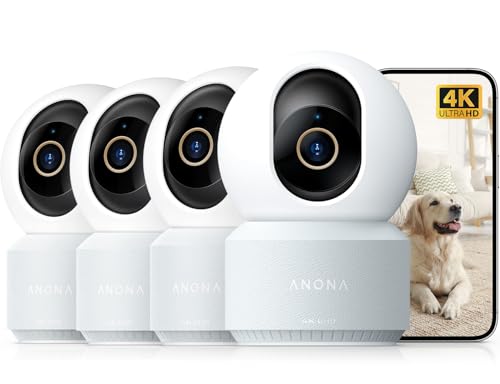
- Four indoor cameras included
- 4K video with remote pan and tilt
- App-based person alerts and two-way audio
Best For: Wi-Fi households monitoring several rooms by phone
Best Simple Call-Button Kit

- One-room, no-Wi-Fi setup
- Four labeled requests plus SOS
- Portable screen with two-way talk
Best For: Local monitoring of one room with manual help requests
Best Routine Reminders

- Timed medication or meal reminders
- Manual call button with distinct requests
- No-Wi-Fi screen and two-way talk
Best For: In-home caregivers who value recurring routine prompts
Best Large-Screen No-Wi-Fi Monitor

- 5-inch screen with night vision
- Medication and temperature reminders
- Separate one-button assistance device
Best For: In-home caregivers avoiding Wi-Fi and apps
Best for Remote Family Check-Ins
SYMYNELEC One-Touch Video Calling Camera

- One-button calls to family phones
- App viewing with shared access
- Physical lens-away privacy mode
Best For: Families coordinating remote video check-ins
Best Compact No-Wi-Fi Receiver
Deerift Elderly Monitor with SOS Button

- Portable 2.8-inch receiver
- SOS button and routine reminders
- No-Wi-Fi FHSS connection
Best For: Caregivers moving between rooms at home
Easy Video Check-Ins
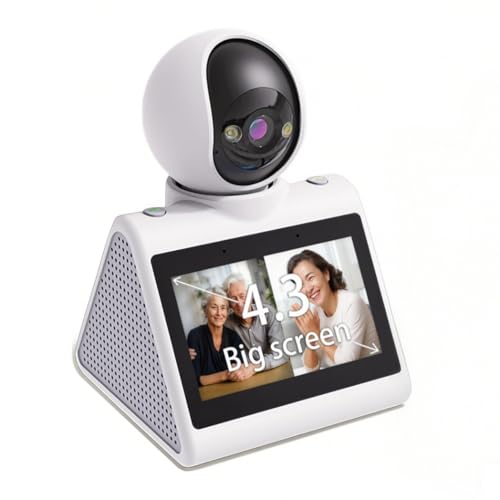
- One-button video calls to a phone
- 1080p video with night vision and motion alerts
- 2.4GHz Wi-Fi only; SD card sold separately
Best For: Simple face-to-face family check-ins
No-Wi-Fi Care Alerts

- Five distinct assistance and SOS buttons
- Two-way audio and infrared night vision
- Local screen; no smartphone app
Best For: Local monitoring with specific care-request buttons
Smart Display Pick
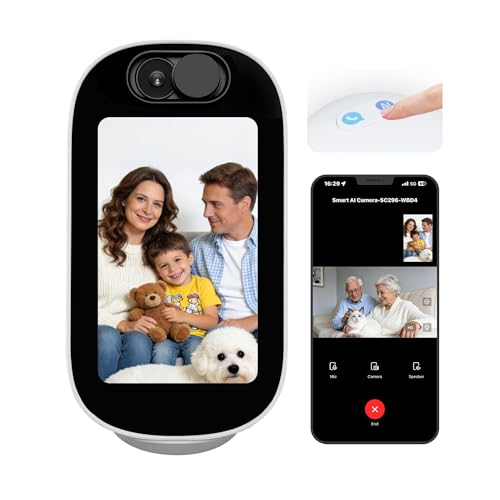
- 4-inch display with two-way video calls
- Human detection and motion tracking
- Dual-band Wi-Fi; no listed SOS button
Best For: Connected households wanting video calls and activity alerts
Best Two-Room Setup – CallToU Two-Camera Elderly Monitor
For dementia room monitoring cameras focused on two familiar spaces, this CallToU kit lets you check a bedroom and living room from one portable screen. Its direct connection needs no Wi-Fi or phone app.
Best For: In-home caregivers who want to switch between two rooms and receive specific, manually triggered requests for help.
Pros:
- Two cameras share one 2.8-inch handheld monitor.
- Four labeled request buttons and a rear SOS trigger an alert until acknowledged.
- 720p video, two-way talk, infrared night vision, and VOX sound monitoring support check-ins.
Cons:
- Displays one camera view at a time, not both simultaneously.
- The call button requires a manual press; it does not detect falls.
- Indoor range depends on your home’s layout.
Choose this over a single-camera kit if coverage of two rooms matters more than simultaneous viewing. Test the connection in both locations after setup.
Best App-Based Four-Pack – Anona 4K Indoor Cameras
Among dementia room monitoring cameras, this four-camera Anona pack suits households that prefer phone-based viewing across several indoor spaces. Its 4K video, app notifications, and remote pan-and-tilt controls offer a different approach from a dedicated bedside monitor.
Best For: Caregivers comfortable with Wi-Fi and a smartphone app who want to view multiple rooms.
Pros:
- Four included cameras support coverage of several indoor rooms.
- 4K video, digital zoom, pan-and-tilt viewing, and auto-tracking provide flexible views.
- Person detection, two-way audio, and a choice of microSD or cloud storage add monitoring options.
Cons:
- Requires Wi-Fi and a smartphone app rather than a dedicated handheld screen.
- MicroSD cards are not included.
- The supplied features do not list a caregiver call button or fall detection.
This is a strong fit for app-based room coverage, but its person alerts should not be mistaken for a dedicated emergency-call system.
Best Simple Call-Button Kit – CallToU Single-Camera Monitor
If you need dementia room monitoring cameras without setting up an app, this single-camera CallToU kit provides a portable screen and a separate request button for one room. Its direct 2.4GHz FHSS connection does not require Wi-Fi.
Best For: In-home caregivers monitoring one bedroom or favorite sitting area who want clearly labeled help requests.
Pros:
- Four tactile request buttons identify help, turning over, bathroom, and water needs.
- 720p video, two-way audio, infrared night vision, and VOX support day-and-night check-ins.
- Medication intervals and adjustable room-temperature alerts add routine prompts.
Cons:
- One camera covers one selected view; its angle must be adjusted by hand.
- Help and SOS alerts require a button press; there is no fall detection.
- The 2.8-inch display is intended for status checks rather than fine detail.
This is the straightforward pick when a physical call button is more useful than phone notifications. Place the button within reach and test reception where you plan to carry the screen.
Best Routine Reminders – ABM200 Elderly Monitor
For shoppers comparing dementia room monitoring cameras, the ABM200 combines a no-Wi-Fi video monitor with a one-touch call button and recurring reminders. It is designed for local check-ins rather than phone-based remote viewing.
Best For: Caregivers who want a portable in-home screen alongside medication or meal prompts and a manual help button.
Pros:
- Set reminders at 0.5-, 1-, 2-, 3-, or 4-hour intervals.
- Includes two-way talk, infrared night vision, VOX mode, and a 2.8-inch screen.
- Temperature alerts and distinct call-button requests provide additional cues.
Cons:
- Includes one camera, so it does not provide simultaneous multiroom coverage.
- The SOS button must be pressed; no automatic fall detection is listed.
- The stated range of up to 1,000 feet does not guarantee coverage through indoor obstacles.
The reminder options distinguish this kit, but they work best as caregiver prompts, not confirmation that medication was taken or assistance was received.
Best Large-Screen No-Wi-Fi Monitor – 5-Inch Elderly Room Monitor
For shoppers comparing dementia room monitoring cameras, this kit pairs a 5-inch caregiver screen with a room camera and a separate one-button assistance device. Medication reminders and distinct alerts for SOS, toileting, drinking water, and falls make it especially relevant to daily care routines.
Best For: In-home caregivers who want a dedicated screen and reminder features without Wi-Fi or an app.
Pros:
- 5-inch, 1280 × 720 display with infrared night vision and two-way audio.
- Assistance button can signal different needs; medication and room-temperature reminders add useful prompts.
- Camera pans 355° horizontally and 90° vertically; 2.4GHz FHSS connection requires no Wi-Fi.
Cons:
- No app access for caregivers checking in from outside the local connection range.
- Assistance alerts depend on someone pressing the button; the supplied notes do not establish automatic fall detection.
The larger screen is a practical advantage for bedside or across-the-house checks. Treat the button as a way to request help, not as a substitute for direct supervision or an automatic emergency alert system.
Best for Remote Family Check-Ins – SYMYNELEC One-Touch Video Calling Camera
Among dementia room monitoring cameras, this SYMYNELEC model stands out for communication across households: the person at home can press one button to call bound family phones and see the responder on its 2.8-inch screen. Caregivers use a smartphone app for viewing and settings, so it fits families comfortable managing a Wi-Fi camera.
Best For: Families who want one-touch video calls, shared app access, and remote check-ins.
Pros:
- One-button calling rings bound family phones simultaneously; the first person to answer connects.
- 1080P PTZ auto-tracking and alerts for detected loud crashes or cries for help support remote awareness.
- Physical privacy mode rotates the lens away; local recording supports a memory card up to 128GB, sold separately.
Cons:
- Requires 2.4GHz Wi-Fi and continuous plug-in power.
- Sound-based distress alerts do not confirm that a fall occurred and may not catch a quiet incident.
This is the stronger choice when conversation and remote access matter more than a standalone caregiver receiver. Discuss camera placement and privacy-mode schedules with the person being monitored where possible.
Best Compact No-Wi-Fi Receiver – Deerift Elderly Monitor with SOS Button
If you want dementia room monitoring cameras without an internet connection, the Deerift kit offers a portable 2.8-inch receiver, a movable room camera, and an SOS button. Its medication and daily-routine reminders are geared toward hands-on care rather than remote app viewing.
Best For: Caregivers who carry a compact receiver around the home and want prompts for everyday routines.
Pros:
- Portable 720P receiver has a hidden stand and 4× digital zoom.
- SOS button, medication reminders, and customizable prompts for hydration, activity, or bathroom visits.
- 355° horizontal and 90° vertical camera movement, infrared night vision, and room-temperature alerts.
- 2.4GHz FHSS connection works without Wi-Fi; stated range is up to 500 feet indoors.
Cons:
- Small 2.8-inch display may be less comfortable for extended viewing than a larger receiver.
- Remote phone access is not described, and an SOS alert requires the button to be pressed.
Choose this over a larger-screen kit if a receiver you can keep close is the priority. The stated indoor range is a useful starting point, but walls and layout can affect where the signal works in your home.
Easy Video Check-Ins – 4.3-Inch Screen Camera
Among dementia room monitoring cameras, this indoor model stands out for its built-in 4.3-inch screen and one-button video calling. A family member can press the button to call a phone without navigating an app.
Best For: Families who want simple, face-to-face check-ins alongside remote room viewing.
Pros:
- One-button calling and two-way video make it easier to start a conversation.
- 1080p video, night vision, and motion alerts support day-and-night check-ins.
- Local SD-card storage is available.
Cons:
- Supports 2.4GHz Wi-Fi only.
- SD card is not included.
This is a communication-focused choice rather than a dedicated care alarm. Check whether a one-button call suits the person using it, and plan for Wi-Fi access and a separate SD card if you want local storage.
For shoppers comparing dementia room monitoring cameras without an app, this indoor monitor pairs a camera with a 2.8-inch caregiver screen over a 2.4GHz FHSS connection. Its distinct request buttons give a person a way to signal needs beyond a general SOS alert.
Best For: Caregivers who want a local, no-Wi-Fi monitor with specific assistance buttons.
Pros:
- Five request buttons cover a normal alert, repositioning, toileting, water, and SOS.
- Two-way audio, infrared night vision, and pan-and-tilt viewing support room check-ins.
- Includes medication reminders, temperature alerts, and a sound-activated VOX mode.
Cons:
- No app means it is not designed for viewing from a smartphone away from home.
- The camera requires corded power.
The request buttons may be useful when someone can identify and press the right one; that should be assessed for the individual rather than assumed. This model makes most sense for a caregiver using the included screen within its stated transmission range.
Of these dementia room monitoring cameras, this Aurumbach model is the smart-home-oriented option: it combines a 4-inch display, 4MP video, and one-tap two-way video calls. Human detection, motion tracking, and phone alerts provide additional ways to check activity in an indoor room.
Best For: Families seeking app-based viewing and video calls on a dual-band Wi-Fi network.
Pros:
- Built-in screen supports video calls with a phone or between rooms.
- Human detection, 355-degree pan, and auto-tracking help follow movement.
- Supports both 2.4GHz and 5GHz Wi-Fi.
Cons:
- Requires corded power and Wi-Fi connectivity.
- No dedicated SOS or care-request button is listed in the supplied features.
The display can also show photos, time, or weather, while its AI conversation feature offers simple voice interaction. Those extras may suit a connected household, but they do not replace a care-specific alert system.
How We Picked the Best Dementia Room Monitoring Cameras
We compared the 10 selected products by the features most relevant to caregiver check-ins: live video and audio, two-way talk, resident-initiated calling, viewing options, night vision, and connectivity. We also considered whether extras such as pan-tilt viewing, motion alerts, and medication reminders address a real care need. Listed features can vary by configuration, so confirm the exact model and included accessories before buying. None of these cameras should be relied on as a medical device or a guaranteed emergency-alert system.
Quick Comparison: Which Setup Fits?
- Call-button monitors: Worth considering when the resident can recognize and press a button to request help. Check that the button is included and can be placed within easy reach.
- Dedicated-screen monitors: Useful for a caregiver who wants a simple display without opening a phone app. Check whether the screen works across the distances and rooms you need.
- App-connected pan-tilt cameras: Offer flexible remote viewing and a wider look around a room, but depend on compatible Wi-Fi, an app, and account access.
- Reminder-equipped models: Can support an established medication routine, but should not be your only way to confirm a dose was taken.
Key Buying Factors for Dementia Room Monitoring Cameras
Communication and Response
Two-way talk can make a check-in less startling than watching silently. A one-touch video call or call button may also give the resident a way to initiate contact, provided they can use it consistently. Decide in advance who receives calls or alerts, when they are available, and what happens if no one answers.
Coverage and Nighttime Viewing
Position the camera to show the area you need to check, not private spaces unnecessarily. Pan-tilt can help cover more of a room, while night vision matters if overnight check-ins are the priority. Motion or sound alerts may be useful, but they can also produce nuisance notifications; test their settings in the actual room.
Connectivity, Privacy, and Cost
A no-Wi-Fi monitor may suit in-home viewing, but verify whether it offers any access when the caregiver is away. For app-based cameras, check Wi-Fi compatibility, account-sharing options, security settings, and whether recording or alert features require a subscription. Tell the resident and other household members about the camera, seek appropriate consent, and follow any care-facility rules.
Who Should Buy Which Dementia Room Monitoring Cameras?
Choose a call-button model if the resident wants to ask for help and can reliably operate it. Choose a dedicated screen for straightforward check-ins from elsewhere in the home. Choose an app-connected camera when trusted caregivers need to view the room remotely and can manage its connectivity and privacy settings. Consider reminder features only as a supplement to a medication plan. If wandering, falls, or urgent medical events are the primary concern, make a broader care and response plan rather than depending on a room camera alone.